
Photography is my go-to art medium. I think it’s because I’m able to visualize what I want a piece to look like, and working with standard art mediums (drawing, painting, etc) doesn’t work for my extremely limited attention span. I have a very hard time taking the time to let something not be finished for a while. Anyways, I found photography, and it instantly resonated with me, and not just because it was quick.
If I’m being honest, photography is not that quick. Black-and-white especially is time consuming. You have to:
- Take the film out of the roll and get it into a light-locked container that can still have liquids added to it. You do this in a small closet that is completely 100% pitch black.
- Carefully follow the procedure of science, which usually takes about a half-hour, to fix the image into the film.
- Let the film dry, since you just put a bunch of science juice on it.
- Look at the negatives and try to figure out which images will probably look good at full size.
- Give up and take a good guess.
- Go into the Dark Room. The Dark Room can have red light, since it doesn’t affect the photo paper, but it’s not that bright. Still pretty dark.
- Line up your negative in the enlarger.
- Take a good guess where the center of your image should be.
- Make a test strip to see how much light you need.
- Do different science juice to the test strip.
- Look at the test strip to see which light level is correct.
- Guess some more.
- Set the light level.
- Did you get it lined up correctly? Check again.
- Expose the paper.
- Re-do that second version of science juice, but to the entire image.
- Dry it out.
- Look at it.
- If it’s wrong, go back to step 5, 13, or 15, depending on what the problem is.
So yeah, it’s not just iPhone camera and go. It’s an amount of work, but if you do it right, it looks really nice. Here’s one of my better artistic pictures:
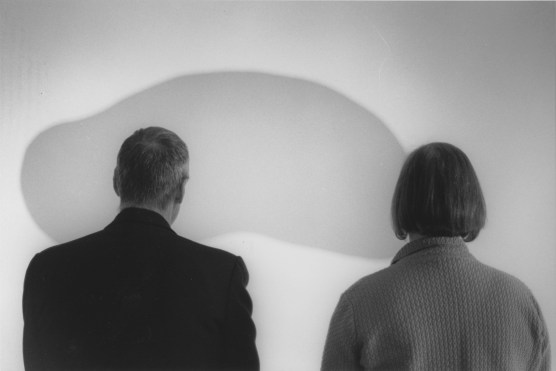
The contrast could be better on the jacket on the left, but you can see a lot of detail in the hair and the jacket on the right. And the background leaves a lot to the imagination without overtaking the image. You know, fancy art stuff like that. But I had other ideas.
I knew that Photoshop could be used to merge photos, but there had to have been a process for doing so with older technology. For one project, I looked up that technology, and put it into effect. This adds a few steps to the process. For example, you need two enlargers. Make sure you ask if anyone needs enlargers before you start commandeering the entire Dark Room. Then, when you go to make the full image, you have to expose just part of it (in this case, left or right half). You do this with the advanced technology of A Piece of Cardstock Held Over the Paper. Make sure you feather the edge; otherwise, you can get a hard line that doesn’t look good. Now, line up the halfway exposed image on the other enlarger, hope you lined it up right because you can’t do any tests now, and expose the other side. Complete the process as normal.
And that’s how I made one photo of two of me. Tune in next time I do this, when I go through Self Portrait 2, which has over a dozen of me.
 That's Pretty NEET